What is Activity Lifecycle?
Imagine you're reading a book. Sometimes you're actively reading, sometimes you bookmark and put it aside, sometimes you close it completely. An Android Activity goes through similar states from when it's created until it's destroyed.
The Activity Lifecycle is the journey an activity goes through from birth to death, with several states in between. Android calls specific methods at each stage, and you can write code in these methods to handle what happens at each stage.
Why Do We Need Activity Lifecycle?
Real-world scenario:
- You're watching a YouTube video
- A phone call comes in
- The video pauses automatically
- After the call, you return and the video resumes
This happens because YouTube's activity responds to lifecycle changes!
Without lifecycle management:
- Music would keep playing during phone calls
- Games wouldn't pause when you switch apps
- Apps would waste battery running in the background
- Your game progress would be lost if you rotate the screen
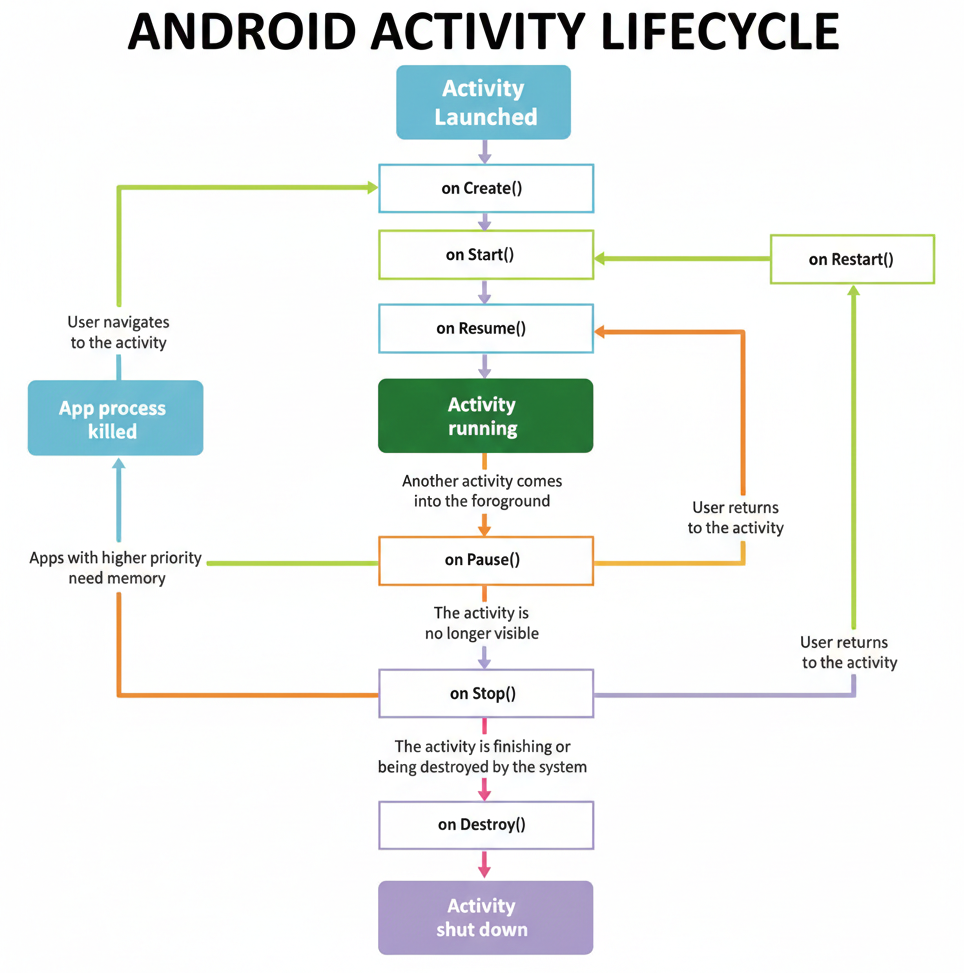
Let me explain each one in detail:
1. onCreate()
When it's called: When the activity is first created (born)
What it means: The activity is being set up for the first time
What happens here:
- Initialize the activity
- Set the layout (what the screen looks like)
- Set up buttons, text fields, images
- Initialize variables
- Connect to databases
Real-world analogy: Like waking up and getting out of bed for the first time in the morning
Example code:
@Override
protected void onCreate(Bundle savedInstanceState) {
    super.onCreate(savedInstanceState);
    setContentView(R.layout.activity_main); // Set the screen layout

    // Initialize views
    Button loginButton = findViewById(R.id.loginButton);
    TextView welcomeText = findViewById(R.id.welcomeText);

    // Set up click listeners
    loginButton.setOnClickListener(v -> {
        // Handle login
    });
}
Important: This is called only once in the activity's lifetime (unless it's completely destroyed and recreated)
2. onStart()
When it's called: After onCreate(), when the activity is about to become visible
What it means: The activity is preparing to be shown to the user
What happens here:
- The activity is now visible but not yet interactive
- Start animations
- Register listeners that should work when visible
Real-world analogy: Like getting dressed and ready to meet people - you're prepared but haven't stepped out yet
Example:
@Override
protected void onStart() {
    super.onStart();

    // Start animations
    // Register broadcast receivers
    // Update UI with fresh data
}
Important: Can be called multiple times (every time the activity becomes visible again)
3. onResume()
When it's called: After onStart(), when the activity is ready for user interaction
What it means: The activity is now in the foreground and active - the user can interact with it
What happens here:
- Start camera preview
- Resume animations/games
- Start location updates
- Resume music playback
Real-world analogy: Like actively working at your desk - you're fully engaged and productive
Example:
@Override
protected void onResume() {
    super.onResume();

    // Resume video playback
    videoPlayer.play();

    // Start camera
    camera.startPreview();

    // Resume game
    gameEngine.resume();
}
Important: This is where the activity is running and interactive. Can be called multiple times.
RUNNING STATE ⚡
This is not a method, but the state when your activity is fully active. The user is interacting with your app. This is what you're aiming for!
4. onPause()
When it's called: When the activity is about to lose focus (another activity is coming to the foreground)
What it means: The user is leaving your activity (but it's still partially visible)
Common situations:
- User presses the Home button
- Another activity appears on top (like a dialog or popup)
- Multi-window mode - another app takes focus
- Phone call incoming
- User opens notification panel
What happens here:
- Pause animations/videos
- Stop camera preview
- Save unsaved work
- Release resources that consume battery
Real-world analogy: Like someone interrupting you at work - you pause what you're doing but don't pack up completely
Example:
@Override
protected void onPause() {
    super.onPause();

    // Pause video
    videoPlayer.pause();

    // Save user's current progress
    saveGameProgress();

    // Stop camera
    camera.stopPreview();

    // Pause location updates
    locationManager.removeUpdates(this);
}
Important: This method should execute quickly because the next activity won't start until this finishes. Don't do heavy operations here!
Critical Rule: After onPause(), the activity can be killed by the system if memory is needed. So save important data here!
5. onStop()
When it's called: When the activity is no longer visible to the user
What it means: The activity is completely hidden (another activity has taken over the screen)
Common situations:
- User navigates to another activity
- User presses Home and goes to launcher
- User switches to another app
What happens here:
- Release resources that aren't needed when not visible
- Stop animations completely
- Unregister listeners
- Save data to database
Real-world analogy: Like closing your laptop and stepping away from your desk - work is saved, lights are off
Example:
@Override
protected void onStop() {
    super.onStop();

    // Stop background tasks
    stopBackgroundSync();

    // Save to database
    saveDataToDatabase();

    // Release heavy resources
    releaseMemoryIntensiveResources();

    // Unregister receivers
    unregisterReceiver(myReceiver);
}
Important: From this state, the activity can either come back to life (onRestart() → onStart() → onResume()) or be destroyed.
6. onRestart()
When it's called: When a stopped activity is about to start again
What it means: The activity was stopped and is now coming back
What happens here:
- Restore the state that was released in onStop()
- Refresh data that might have changed
Real-world analogy: Like returning to your desk after a break - you pick up where you left off
Example:
@Override
protected void onRestart() {
    super.onRestart();

    // Refresh data
    loadFreshData();

    // Re-register receivers
}
Flow: onRestart() → onStart() → onResume() → RUNNING
Important: This is called only when the activity is restarting from a stopped state, not when it's created for the first time.
7. onDestroy()
When it's called: Before the activity is completely destroyed
What it means: The activity is finishing or being killed by the system
Common situations:
- User presses Back button (finishes the activity)
- finish() is called in code
- System kills the activity to free up memory
- Configuration change (screen rotation) - activity is destroyed and recreated
What happens here:
- Final cleanup
- Release all resources
- Close database connections
- Cancel background threads
Real-world analogy: Like your last day at work - clean your desk, return keys, say goodbye
Example:
@Override
protected void onDestroy() {
    super.onDestroy();

    // Close database
    database.close();

    // Cancel pending tasks
    executorService.shutdown();

    // Unregister all listeners

    // Release memory
}
Important: After this, the activity object will be garbage collected. It's gone forever (unless created fresh again).